AI-Powered Search Comes to Sitecore Documentation: A New Way to Find, Understand, and Use Sitecore Knowledge
Introduction
If you work with Sitecore, finding the right piece of documentation has traditionally meant knowing what to search for.
That is changing.
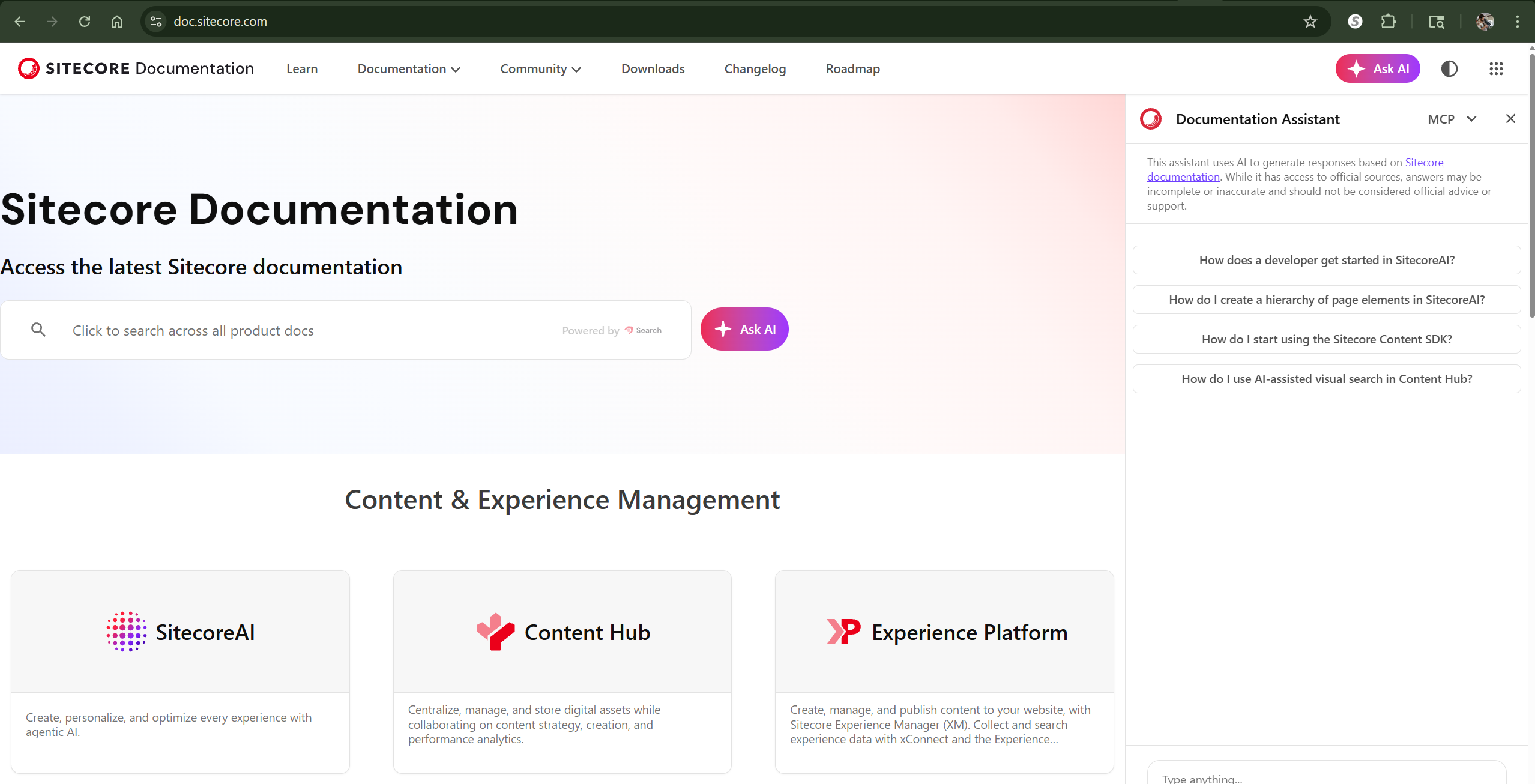
The latest Sitecore Documentation experience introduces AI-assisted ways to interact with Sitecore’s documentation, combining traditional documentation search with an AI-powered Documentation Assistant. The result is a more conversational approach to finding answers, understanding technical concepts, and navigating an increasingly large Sitecore ecosystem.
The screenshots accompanying this article show several pieces of that experience:
- Traditional documentation search
- AI-assisted search queries
- The Ask AI experience
- The Documentation Assistant
- Suggested questions
- AI-generated answers grounded in Sitecore documentation
- The ability to connect external AI development tools through MCP
This is more than adding a chatbot to a documentation site. It changes the way developers can interact with Sitecore’s technical knowledge base.
Traditional Search Still Matters
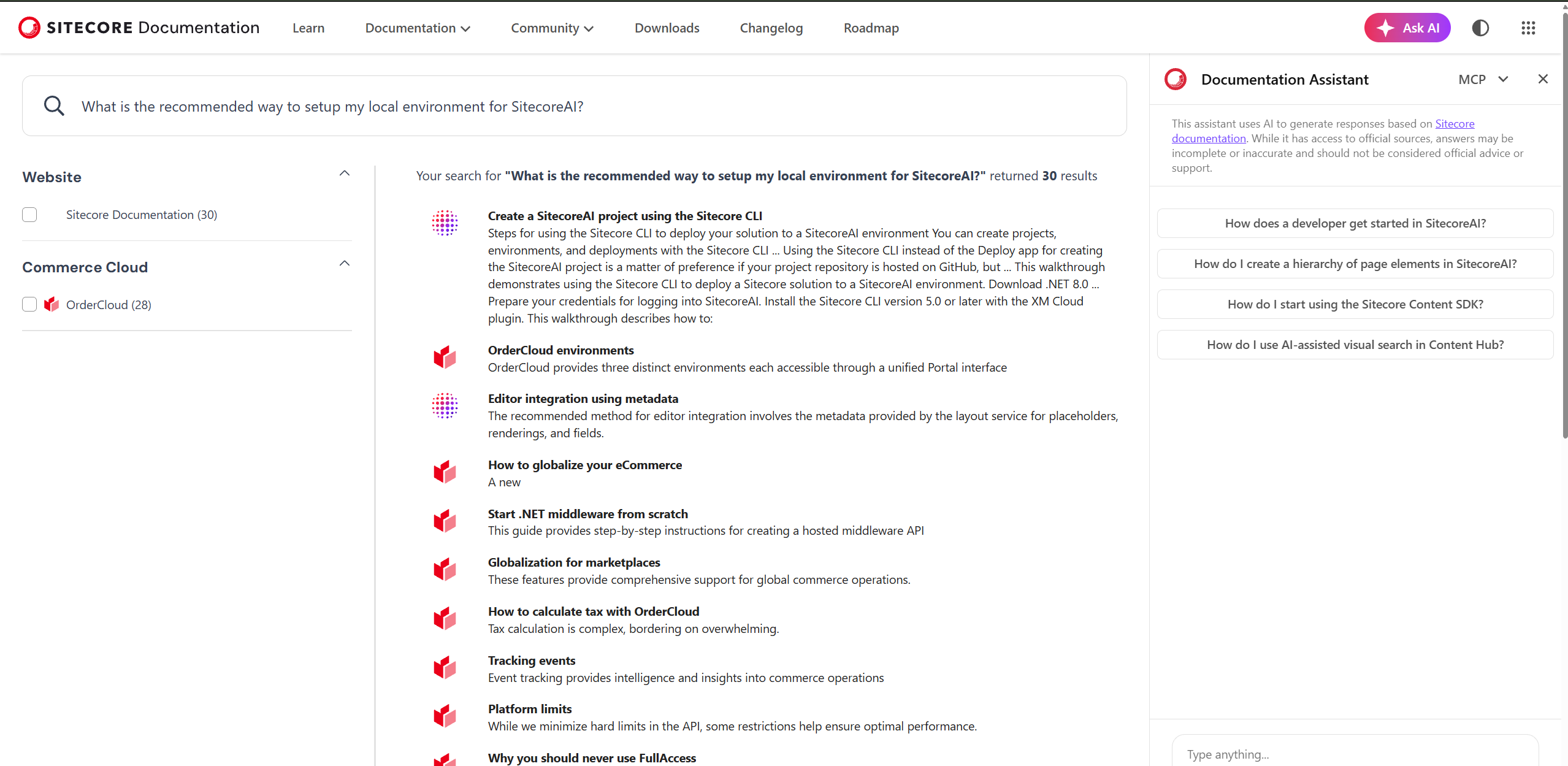
The first layer of the experience is familiar: the Sitecore Documentation search interface.
A developer can enter a natural-language query such as:
“What is the recommended way to setup my local environment for SitecoreAI?”
Instead of requiring an exact documentation title or keyword combination, the search engine returns potentially relevant documentation across the Sitecore ecosystem.
In the example shown in the screenshots, the results include topics such as:
- Creating a SitecoreAI project using the Sitecore CLI
- SitecoreAI environments
- Editor integration
- Commerce and OrderCloud
- Middleware
- Platform limits
This is particularly useful because Sitecore documentation spans multiple products and technology stacks. A single search can surface related documentation without requiring the developer to know exactly which product documentation contains the answer.
The documentation site itself describes its purpose as providing access to the latest documentation across products including SitecoreAI, Content Hub, Experience Platform, OrderCloud, Discover, and others.
From Search Results to Answers
The more interesting change is the introduction of Ask AI and the Documentation Assistant.
Rather than simply returning a list of pages, the developer can ask a question conversationally.
For example:
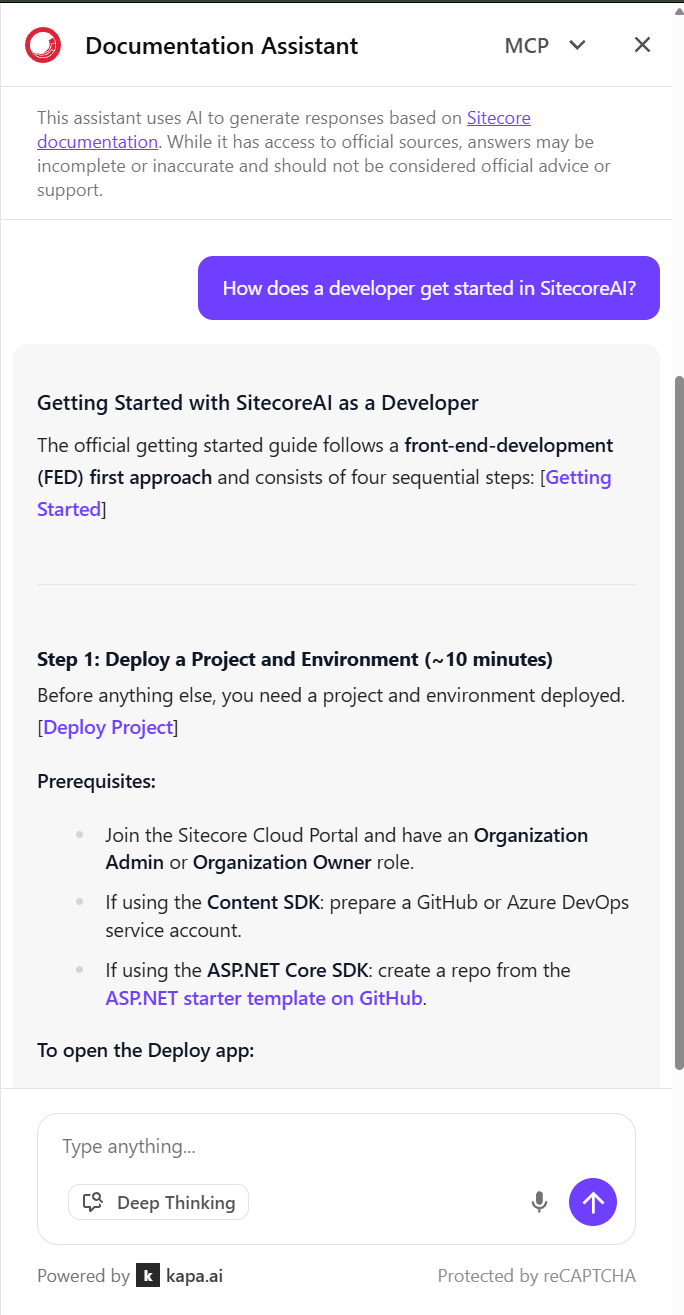
“How does a developer get started in SitecoreAI?”
The Documentation Assistant responds with a structured explanation based on Sitecore documentation.
In the screenshot, the response begins with a developer-oriented getting-started workflow and identifies the prerequisites for deploying a SitecoreAI project. It then breaks the process into sequential steps.
This is a fundamentally different interaction model.
Traditional search answers:
“Here are the documents that might contain your answer.”
AI-assisted documentation can instead answer:
“Here is what the documentation says about your question.”
That distinction becomes increasingly valuable as documentation grows.
The Documentation Assistant Is Grounded in Sitecore Documentation
An important detail in the interface is the disclaimer displayed above the Documentation Assistant:
The assistant uses AI to generate responses based on Sitecore documentation.
It also explicitly warns that AI-generated responses may be incomplete or inaccurate and should not be considered official advice or support.
That distinction matters.
The assistant should be viewed as a documentation navigation and synthesis tool, rather than a replacement for the underlying documentation or Sitecore Support.
This is especially important for architectural and implementation decisions where version, environment, configuration, and licensing details can materially change the correct answer.
Sitecore’s own documentation makes a similar distinction for its AI capabilities: AI-generated results should be reviewed for accuracy and context, with human oversight remaining important.
Natural-Language Questions Make Technical Documentation More Accessible
One of the strongest aspects of the new experience is that developers don’t necessarily need to know the terminology used by the documentation.
Consider a question such as:
“How do I start using the Sitecore Content SDK?”
A developer doesn’t need to know whether the answer is located under:
- SitecoreAI
- Developers
- Content SDK
- Next.js
- Getting Started
- Architecture
- CLI
The AI layer can help bridge that gap.
The current Content SDK documentation describes Content SDK as a way to integrate SitecoreAI content with front-end JavaScript applications and provides a Next.js starter template, APIs, GraphQL utilities, personalization, analytics, event tracking, multi-site support, SSR, and SSG capabilities.
The assistant can therefore become a starting point for understanding not only where the documentation is, but how the different pieces relate to one another.
Asking More Specific Technical Questions
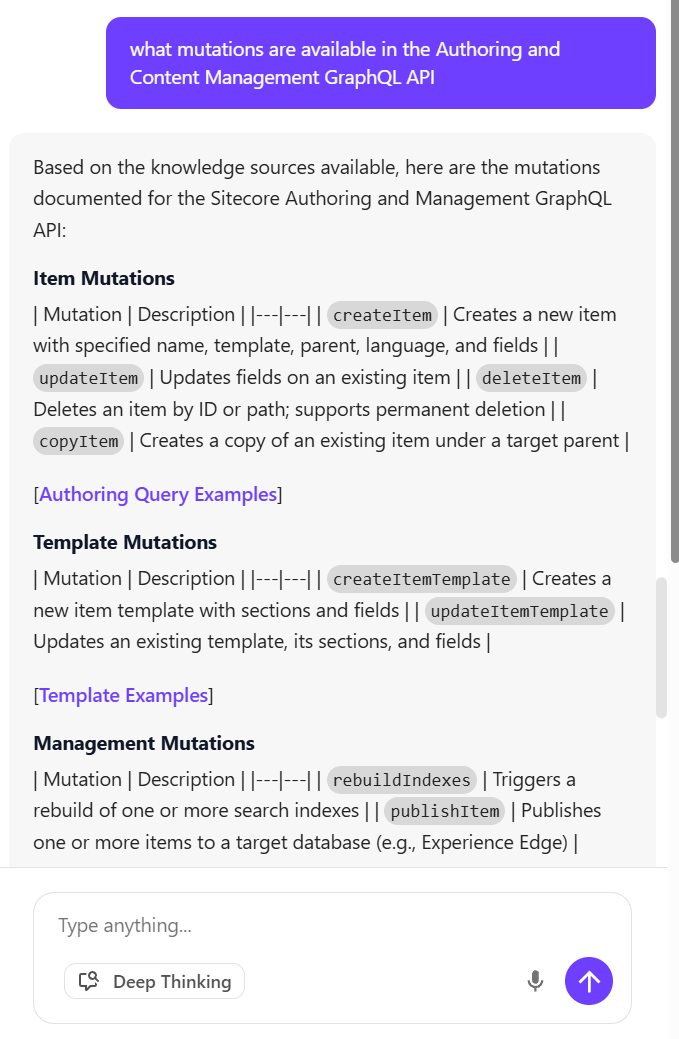
The screenshots also demonstrate another important use case: asking questions that would traditionally require searching across multiple documentation pages.
For example:
“What mutations are available in the Authoring and Content Management GraphQL API?”
Instead of manually navigating the API documentation, a developer can ask the question directly.
This type of question is particularly well suited to AI-assisted documentation because the answer may involve grouping related operations into categories such as:
- Item mutations
- Template mutations
- Management mutations
- Publishing operations
- Index operations
The important caveat is that developers should still validate generated API examples against the version-specific API reference before using them in production.
SitecoreAI documentation currently provides documentation for creating and modifying site content through the Authoring and Content Management GraphQL API, while published content can be queried through the Experience Edge GraphQL delivery API.
AI Search Doesn’t Eliminate the Need for Good Documentation
In fact, it makes high-quality documentation more important.
An AI assistant can only provide useful answers when the underlying documentation contains the information required to answer the question.
This is particularly apparent in Sitecore Search’s own AI-powered Questions and Answers capability. Sitecore explicitly notes that the quality and relevance of generated answers depend on the content indexed by the underlying source.
The same principle applies conceptually to documentation assistants:
Better source material → better answers.
This means documentation architecture, terminology, versioning, examples, and metadata become increasingly important in an AI-assisted developer experience.
The Documentation Assistant Goes Beyond the Browser
One of the most interesting capabilities shown in the screenshots is the MCP menu.
MCP stands for Model Context Protocol.
The Sitecore Documentation Assistant provides options to connect documentation knowledge to external AI development tools, with the interface shown offering integrations for:
- Cursor
- Visual Studio Code
- Claude Code
- Other AI tools through an MCP URL
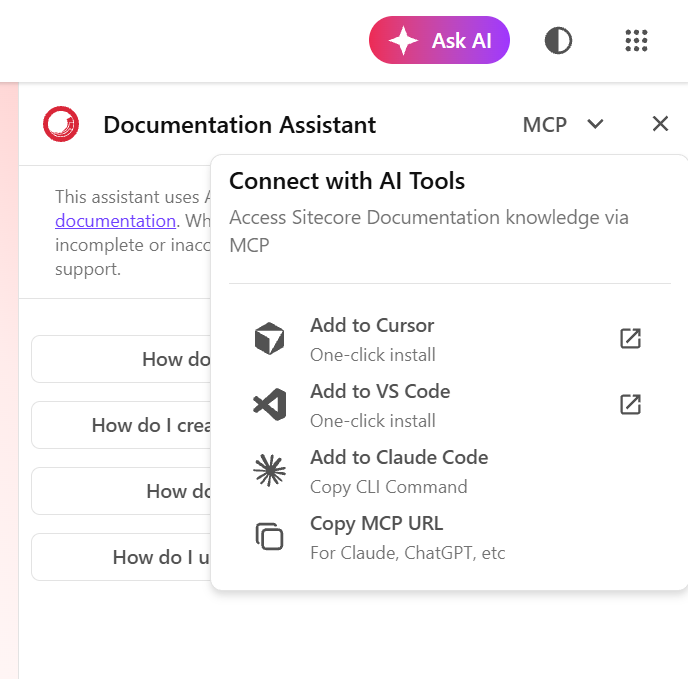
This is a significant step beyond simply putting an AI chatbot on a website.
Instead of requiring a developer to leave their IDE, open a browser, search Sitecore documentation, and copy the answer back into their development workflow, documentation knowledge can be made available to AI tools where development is already taking place.
Why MCP Matters to Sitecore Developers
Consider a developer working on a Content SDK application in Cursor.
They might ask their AI coding assistant:
“How should I configure this component for Content SDK?”
The developer’s AI tool can potentially use the Sitecore documentation knowledge source through MCP rather than relying exclusively on its general training data.
That distinction is important for rapidly evolving platforms.
General-purpose AI models may have incomplete knowledge of:
- New Sitecore releases
- Newly introduced APIs
- Current configuration patterns
- Product-specific terminology
- Version-specific behavior
- Recently changed SDK packages
Connecting an AI coding tool to the documentation source creates a path toward current, product-specific technical context.
The Sitecore documentation site currently exposes its Documentation Assistant through an MCP interface, as shown directly in the screenshots.
AI-Assisted Documentation Changes the Developer Workflow
The traditional developer workflow looks something like this:
Question
   ↓
Open documentation
   ↓
Choose product
   ↓
Choose version
   ↓
Search
   ↓
Open multiple pages
   ↓
Read and compare
   ↓
Determine the answer
   ↓
Implement
The AI-assisted workflow can be much shorter:
Question
   ↓
Ask AI
   ↓
Receive documentation-grounded explanation
   ↓
Verify relevant documentation
   ↓
Implement
And with MCP:
Developer
   ↓
IDE / AI coding assistant
   ↓
Sitecore Documentation via MCP
   ↓
Documentation-grounded context
   ↓
Implementation
The third model is particularly interesting because it puts Sitecore knowledge inside the developer’s existing workflow.
This Is Especially Relevant for SitecoreAI
The timing is significant.
Sitecore’s current documentation increasingly spans a broader ecosystem around SitecoreAI, including:
- SitecoreAI Pages
- Content SDK
- GraphQL
- Experience Edge
- Search
- Personalization
- Analytics
- Content Hub
- Agentic capabilities
- Cloud deployment
- CLI tooling
- APIs and integrations
The Content SDK documentation alone now includes a broad set of capabilities around front-end development, visual editing, personalization, analytics, event tracking, multi-site implementations, GraphQL, SSR, and SSG.
As the platform becomes more capable, the amount of information developers need to understand also increases.
AI-assisted documentation becomes a practical way of reducing that cognitive load.
AI Search Is Not the Same as Sitecore Search on Sitecore’s website
There is an important distinction worth making.
The AI-assisted capabilities demonstrated on docs.sitecore.com are about finding and understanding Sitecore documentation.
They should not be confused with Sitecore Search, which is a product used to provide search experiences for websites and applications.
Sitecore Search provides capabilities for indexing content, configuring search experiences, improving textual relevance, personalizing results, and integrating search into applications.
The concepts are related, but the use cases are different:
Sitecore Documentation AI
        ↓
Help developers understand Sitecore

Sitecore Search
        ↓
Help website visitors find and interact with content
That distinction is important when discussing “AI search” within the Sitecore ecosystem.
What Developers Should Take Away
The biggest takeaway isn’t simply that Sitecore documentation now has an AI chatbot.
It is that documentation is becoming an interactive developer interface.
Developers can increasingly:
- Search using natural language
- Ask questions instead of guessing keywords
- Get synthesized explanations
- Explore related Sitecore concepts conversationally
- Move from an answer to the underlying documentation
- Access documentation knowledge from AI development tools
- Use MCP to bring documentation context into the IDE
This represents a shift from documentation as a static reference toward documentation as an interactive knowledge system.
A New Model for Sitecore Development
For Sitecore architects and developers, I think the most interesting part of this evolution is what happens when AI-assisted documentation becomes part of the normal development lifecycle.
Instead of:
“I need to know how Sitecore works, so I’ll search the documentation.”
The workflow becomes:
“I’m building something. My development environment can access the current Sitecore knowledge base when I need it.”
That is a much more powerful model.
It also creates an important responsibility for developers: don’t blindly trust the generated answer.
Use AI to accelerate discovery.
Use the official documentation to validate the implementation.
Use version-specific documentation and API references for production decisions.
And use your own architectural judgment for everything in between.
Final Thoughts
The new AI-powered search and Documentation Assistant experience on docs.sitecore.com is a meaningful improvement to the Sitecore developer experience.
Traditional search remains valuable for locating authoritative pages, while AI-assisted search provides a more conversational way to explore the platform. The addition of MCP takes the concept another step by making Sitecore documentation accessible from AI development environments such as Cursor, Visual Studio Code, and Claude Code.
For a platform as broad and rapidly evolving as SitecoreAI, that could become increasingly important.
The real opportunity isn’t simply “AI answering documentation questions.”
It’s creating a development workflow where Sitecore knowledge is available at the moment a developer needs it—whether they’re in a browser, an IDE, or an AI-assisted development environment.
And that may ultimately be the more important evolution.
References
- Sitecore Documentation — Central Sitecore documentation portal.
- SitecoreAI Documentation — SitecoreAI developer and user documentation.
- Sitecore Content SDK 2.x — Content SDK architecture and capabilities.
- Content SDK Search API —
SearchServiceand Content SDK search capabilities. - Sitecore Search — Sitecore Search product documentation.
- AI-powered Questions and Answers — Sitecore Search AI-powered Q&A capabilities.